top of page

The Most Dangerous Security Threat Doesn’t Wear a Mask

Writer: Nathaniel Clayton
Nathaniel Clayton
Jun 20
8 min read

The next security breach may be small enough to fit in your pocket

Security awareness poster illustrating a USB baiting attack and physical social engineering threat. A USB flash drive labeled “Confidential Executive Plan” sits on a desk inside a corporate office lobby while a security guard monitors the entrance. Bold text warns, “The Next Security Breach May Be Small Enough to Fit in Your Pocket.” The image highlights how malicious USB devices, removable media, and social engineering tactics can bypass physical security and create cybersecurity risks. Ideal for content about security guard training, cybersecurity awareness, access control, incident reporting, USB security threats, workplace security, information security, and social engineering prevention.

A security guard finds a USB drive near an employee entrance.

The device looks ordinary.

A label on the side reads:

Payroll Review — Confidential

It could belong to an employee.

It could contain important company information.

The helpful response seems obvious.

Plug it into a computer.

Open the files.

Find the owner.

That helpful response may be the attack.

No one forced a door.

No one used a disguise.

No one confronted the security guard.

The attacker used curiosity instead.

This is social engineering in physical security.

It is called baiting.


When Physical Security Becomes Cybersecurity

Physical security and cybersecurity awareness infographic showing a security guard protecting a corporate facility alongside a cybersecurity analyst monitoring digital threats. A suspicious USB device bridges the gap between physical access control and network security, illustrating how USB baiting attacks, social engineering, malware, phishing, and unauthorized access can turn a physical security incident into a cybersecurity breach. The image highlights access control, surveillance, endpoint protection, data security, threat detection, information security, security guard training, cyber awareness, and the critical connection between physical security and cybersecurity in modern organizations.

Physical security and cybersecurity are often treated as separate responsibilities.

They are not.

A device found in a parking lot can become a cybersecurity threat the moment someone carries it inside.

A USB drive can cross a physical perimeter.

Human curiosity can take it the rest of the way.

In The Human Barrier, I write:

“Physical social engineering often intersects directly with cyber security through a tactic known as baiting.”— The Human Barrier

A baiting attack uses an object to influence human behavior.

The object may be a USB flash drive.

It may be an external hard drive.

It may be another form of removable media.

The device is placed where someone is likely to notice it.

The attacker then waits for human nature to do the work.

NIST warns that portable storage media can create cybersecurity risks. It recommends physical and technical controls over how these devices are accessed, stored, and used.


The Device Carries a Story

Cybersecurity and physical security awareness graphic showing a USB flash drive labeled “Q4 Payroll Confidential” as part of a USB baiting attack. The image explains how social engineering uses curiosity, deceptive labels, and strategic placement to encourage employees or security guards to connect unknown devices. A security guard stands in the background while visual callouts highlight how labels create credibility, target specific individuals, and can lead to malware infections, data breaches, unauthorized access, and cybersecurity incidents. Ideal for content about social engineering, USB security threats, physical security, cybersecurity awareness, security guard training, information security, removable media risks, cyber attack prevention, and workplace security best practices.

A random USB drive may be ignored.

A USB drive labelled Employee Salaries feels different.

So does one labelled Executive Meeting Notes.

The words create a story.

The location adds credibility.

A device near the executive parking area may appear to belong to management.

A drive in an employee break room may look like lost company property.

A set of keys attached to it can make it seem personal.

The attacker is not only dropping a device.

They are creating a reason to investigate it.

That is what makes baiting effective.

The victim believes they are making their own decision.

In reality, the decision has been shaped in advance.


Why Security Guards Are Important Targets

Security guard monitoring surveillance cameras and controlling access at a security operations desk while an unidentified individual approaches in the background. Security awareness graphic explaining why security guards are important targets for social engineering, physical security threats, access control bypass attempts, workplace security breaches, and insider threat attacks. The image highlights security guard responsibilities including surveillance, incident reporting, communication, perimeter protection, access control, threat detection, and protecting sensitive systems. Ideal for content about security guard training, social engineering awareness, security officer duties, corporate security, security operations centers, risk management, and physical security best practices.

Security guards often discover lost property first.

They patrol parking lots.

They inspect lobbies.

They monitor loading docks.

They respond when employees report suspicious objects.

They also work near computers connected to important security systems.

That combination makes frontline security personnel valuable targets.

As I explain in The Human Barrier:

“The physical security guard is a prime target for this tactic, both as a direct recipient and as the person responsible for monitoring areas where bait is placed.”— The Human Barrier

A guard may plug in an unknown device for a reasonable purpose.

They may want to identify its owner.

They may want to confirm whether it contains company files.

They may believe they are protecting confidential information.

But good intentions do not make an unknown device safe.


A Found USB Drive Is Not Ordinary Lost Property
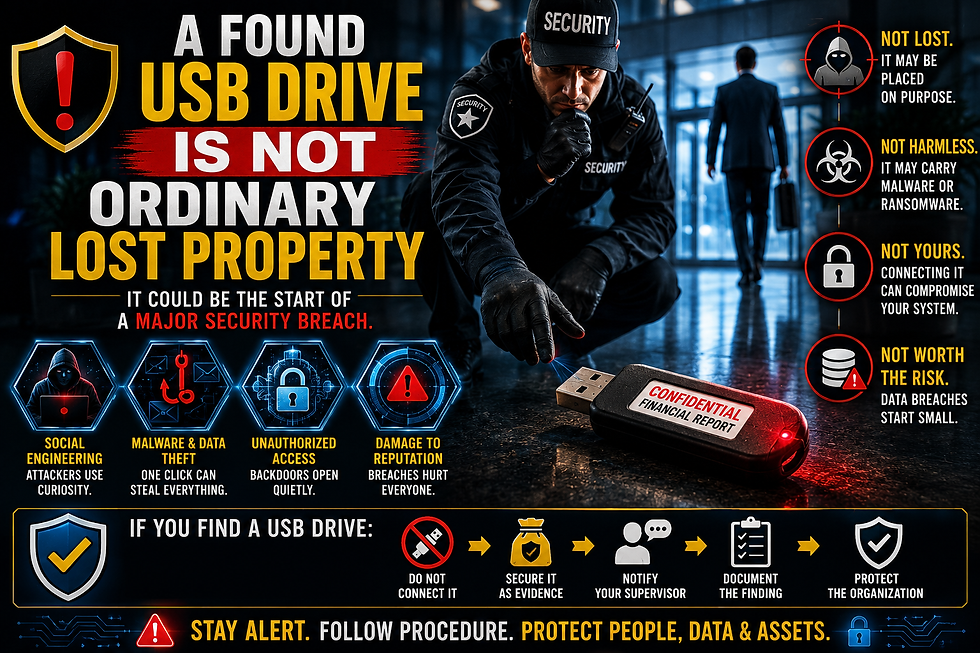
Security awareness poster showing a security guard discovering a suspicious USB flash drive labeled “Confidential Financial Report” in a corporate facility. The image warns that a found USB drive is not ordinary lost property and may be part of a USB baiting attack, social engineering scheme, malware infection, ransomware attack, data theft attempt, or unauthorized access operation. Visual elements highlight cybersecurity risks, physical security threats, incident reporting, evidence handling, security guard procedures, and workplace security awareness. Ideal for content about USB security, cybersecurity training, information security, social engineering prevention, physical security operations, cyber threats, security officer training, and protecting organizational data, people, and assets.

A wallet can be inspected without connecting it to a network.

A set of keys can be secured without giving it access to a computer.

A USB device is different.

It can interact directly with an information system.

It may contain malicious files.

It may attempt to load software.

It may identify itself to the computer as something other than ordinary storage.

NIST notes that portable devices can connect through processing chips and may load driver software. This creates risks beyond those associated with simple, non-device media.

The safest assumption is simple:

An unknown device has not been verified.

Therefore, it should not be trusted.


The Attacker Wants Someone to Complete the Connection

Cybersecurity and social engineering awareness graphic illustrating a USB baiting attack. The image shows an attacker placing a malicious USB drive near an employee entrance, a security guard picking up the device, and the potential compromise of a computer system after the USB is connected. The visual explains how social engineering exploits curiosity and human behavior to bypass physical security and create cybersecurity breaches. Ideal for content about USB security, removable media threats, malware prevention, security guard training, physical security, cybersecurity awareness, social engineering attacks, workplace security, information security, data protection, incident reporting, and cyber threat prevention.

A baiting attack has two parts.

The attacker places the object.

Someone else connects it.

That second action matters.

The device cannot reach a protected workstation while it remains outside.

A person must carry it across the perimeter.

A person must insert it into a computer.

A person must turn an abandoned object into a trusted connection.

The attacker may never enter the facility.

They may never speak to a security guard.

They may never appear at the front desk.

They only need someone inside to finish the job.

This is why the human element remains central to security.

In The Human Barrier, I describe that weakness as:

“The single element that technology cannot patch, encrypt, or mechanically reinforce: the human operating system.”— The Human Barrier

The device targets the computer.

The story attached to the device targets the person.


The Security Desk Is Not a Testing Lab

Security awareness and cybersecurity training poster showing a security guard at a security desk handling a suspicious USB device as evidence rather than testing it. The image emphasizes that unknown USB drives, removable media, and found electronic devices should never be connected, tested, or investigated by frontline security personnel. Visual instructions highlight incident reporting, evidence preservation, documentation, information security procedures, malware prevention, cybersecurity awareness, USB baiting attacks, social engineering threats, and security guard best practices. Ideal for content about physical security, cybersecurity training, access control, workplace security, cyber threat prevention, security operations, data protection, and organizational security procedures.

An unknown USB drive should never be tested on a security workstation.

It should not be connected to a CCTV computer.

It should not be inserted into an access control terminal.

It should not be opened on a personal laptop.

It should not be taken home for inspection.

Moving the device to another computer does not make it safe.

An “offline” computer may also contain information that matters.

It may later reconnect to the network.

The device may also be important evidence.

Frontline personnel should not attempt to analyze it themselves.

That responsibility belongs to an authorized cybersecurity, digital forensics, or information security team using approved equipment and procedures.


What a Security Guard Should Do With an Unknown USB Drive

Security guard training infographic explaining what to do with an unknown USB drive found in the workplace. The image provides step-by-step guidance for handling suspicious removable media, including not connecting the device, securing it as evidence, notifying supervisors and cybersecurity teams, documenting the discovery, and following security procedures. The graphic highlights USB baiting attacks, social engineering threats, malware prevention, incident reporting, evidence preservation, cybersecurity awareness, information security, workplace security, physical security operations, and security guard best practices. Ideal for content about USB security, cyber threat prevention, security officer training, data protection, risk management, and organizational security awareness.

The response should be calm and controlled.

Do Not Connect It

Cybersecurity awareness poster warning employees and security guards not to connect unknown USB devices. The image shows a USB flash drive marked as an unknown device blocked from connecting to a laptop, highlighting the risks of USB baiting attacks, malware infections, ransomware, data breaches, unauthorized access, and social engineering threats. A security guard stands in the background while the graphic emphasizes incident reporting, cybersecurity awareness, workplace security, information security, data protection, security guard training, removable media risks, cyber threat prevention, and following security procedures when suspicious USB drives are discovered. Ideal for content about physical security, cybersecurity best practices, access control, and organizational security awareness.

Do not insert the device into any computer.

Do not attach it to a phone or tablet.

Do not open it to identify the owner.

Do not allow another employee to test it.

Secure the Device

Security awareness infographic showing the proper procedure for securing a suspicious USB drive found in the workplace. The image demonstrates evidence handling, secure storage, incident reporting, documentation, and chain-of-custody procedures for unknown removable media. A USB device is placed in an evidence bag and secured in a locked container while step-by-step instructions emphasize not connecting the device, labeling it, protecting evidence, and notifying security personnel. Ideal for content about USB baiting attacks, social engineering prevention, cybersecurity awareness, physical security operations, security guard training, evidence preservation, workplace security, information security, cyber threat response, risk management, and organizational security best practices.

Follow the organization’s procedure for suspicious property.

Limit unnecessary handling.

Place the device in the approved container or evidence packaging when directed.

Do not damage or destroy it.

Notify the Right People

Security awareness and incident reporting infographic showing a security guard notifying the appropriate personnel after discovering a suspicious USB drive. The image demonstrates the importance of reporting potential cybersecurity threats to supervisors, Security Operations Centers (SOC), information security teams, IT departments, and law enforcement when required. Visual elements emphasize incident response, evidence preservation, cybersecurity awareness, social engineering prevention, USB baiting attacks, security guard procedures, workplace security, cyber threat reporting, information security, risk management, and organizational security best practices. Ideal for content about security operations, incident reporting, cyber incident response, physical security, cybersecurity training, and protecting people, data, assets, and critical infrastructure.

Contact the security supervisor.

Notify the Security Operations Center.

Inform the Information Security or cybersecurity team.

Use the organization’s established reporting channel.

Document the Discovery

Security incident documentation and evidence handling infographic showing a security officer recording details of a suspicious USB drive discovery. The image demonstrates proper security reporting procedures, including documenting the date and time, exact location, item description, person who found the device, actions taken, and evidence preservation. A USB drive is secured in an evidence bag while an incident report is completed, highlighting cybersecurity awareness, social engineering prevention, USB baiting attacks, security guard training, incident reporting, workplace security, information security, chain of custody, risk management, and security investigation best practices. Ideal for content about physical security operations, cyber incident response, evidence documentation, and organizational security procedures.

Record the exact time.

Record the precise location.

Describe the device and its label.

Identify the person who found it.

Note anyone who handled it.

Request preservation of relevant CCTV footage.

The location may help investigators determine whether the device was lost accidentally or placed deliberately.

As I state in The Human Barrier:

“The ultimate antidote to social engineering is not intuition or guesswork; it is the unwavering, systematic execution of Standard Operating Procedures.”— The Human Barrier

The guard does not need to determine whether the device is malicious.

The guard needs to follow the correct procedure.


The Location Is Part of the Evidence

Security incident documentation and evidence collection infographic showing a security officer recording the exact location of a suspicious USB drive discovery. The image emphasizes that location is part of the evidence in cybersecurity investigations, social engineering incidents, USB baiting attacks, and physical security breaches. A security guard documents where a device was found while preserving evidence, noting nearby objects, recording timestamps, and maintaining chain of custody. The graphic highlights incident reporting, evidence preservation, workplace security, security guard training, information security, cyber threat investigations, risk management, forensic documentation, and security operations best practices for protecting organizational data, people, and assets.

Where the device was found matters.

A USB drive beside a public sidewalk may have been dropped accidentally.

A drive placed directly beside an employee badge reader deserves closer attention.

A device discovered near the same entrance on several occasions may indicate a pattern.

Common areas of concern include:

  • Employee parking lots

  • Reception desks

  • Break rooms

  • Elevator lobbies

  • Loading docks

  • Restrooms

  • Smoking areas

  • Shared workspaces

One device does not automatically prove an attack.

It still requires a security response.

Caution is not an accusation.

It is risk control.


The Label May Reveal the Intended Target

Cybersecurity awareness infographic explaining how labels on suspicious USB drives can reveal the intended target of a social engineering attack. The image shows a USB flash drive labeled “Employee Payroll Q2 Update” and demonstrates how attackers use curiosity, urgency, and trust to target employees, executives, finance departments, HR staff, and IT professionals. The graphic highlights USB baiting attacks, social engineering tactics, malware delivery, ransomware threats, credential theft, cybersecurity awareness, information security, security guard training, workplace security, removable media risks, cyber threat prevention, and incident reporting procedures. Ideal for content about physical security, cybersecurity best practices, USB security threats, and organizational security awareness.

Words such as confidential, payroll, bonuses, or layoffs are designed to attract attention.

They appeal to curiosity.

They may also create concern.

An employee may believe the information could affect their job.

A guard may believe the device contains sensitive material that must be protected immediately.

The label can therefore tell investigators something about the intended victim.

A device labelled Executive Compensation may target employees.

A device labelled Security Camera Upgrade may target security staff.

A device labelled with a department name may have been prepared for a specific location.

Document the wording exactly.

Do not rename it from memory later.

Small details may become important.


Train Security Personnel to Recognize Objects as Threats

Security guard training and security awareness infographic teaching security personnel to recognize everyday objects as potential security threats. The image shows a security instructor training officers to identify suspicious USB drives, chargers, cables, notebooks, containers, and other items that may be used in social engineering attacks, USB baiting incidents, espionage, malware delivery, or unauthorized access attempts. The graphic emphasizes threat recognition, situational awareness, incident reporting, workplace security, physical security operations, cybersecurity awareness, security guard education, risk assessment, security culture, and protecting people, information, assets, and facilities from evolving physical and cyber threats. Ideal for content about security training, social engineering prevention, corporate security, and organizational security awareness programs.

Security training often focuses on people.

Guards learn to observe behavior.

They learn to inspect identification.

They learn to recognize unauthorized access.

Those skills remain essential.

But a social engineering threat does not always have a face.

Training should also cover suspicious media and abandoned electronic devices.

Security personnel should know:

  • Which devices require reporting

  • Who must be contacted

  • How the item should be secured

  • What information belongs in the incident report

  • Who has authority to examine the device

  • How nearby video should be preserved

The procedure should be clear before an incident occurs.

A guard should not have to invent a response while holding an unknown device.


Physical Security and Cybersecurity Need One Procedure

Physical security and cybersecurity collaboration infographic showing a security officer and cybersecurity analyst following a unified incident response procedure for a suspicious USB device. The image demonstrates how physical security incidents, USB baiting attacks, social engineering threats, malware risks, and cybersecurity events require coordinated reporting, documentation, evidence handling, investigation, and follow-up actions. Visual elements highlight security operations, incident response, information security, workplace security, risk management, cyber threat prevention, access control, security guard training, Security Operations Center (SOC) procedures, and organizational security best practices. Ideal for content about integrating physical security and cybersecurity, cyber awareness, security incident management, and protecting people, data, assets, and critical infrastructure.

A USB baiting attack crosses departmental boundaries.

Security may discover the device.

Cybersecurity may inspect it.

Facilities may preserve camera footage.

Management may notify employees.

Human resources may become involved if the label targets staff.

Each department sees one part of the incident.

The organization needs a process that connects them.

NIST recommends using physical controls, technical controls, and employee training to reduce the cybersecurity risks associated with portable storage media.

A complete procedure should identify:

  • Who receives the first report

  • Where the device is stored

  • Who can authorize technical examination

  • How evidence handling is recorded

  • When employees should be warned

  • Whether other areas must be searched

  • How the incident is closed and reviewed

Without coordination, the device may be passed from person to person.

Each handoff creates another opportunity for someone to plug it in.


Curiosity Is Not Carelessness

Cybersecurity awareness and security guard training infographic explaining that curiosity is not carelessness when handling suspicious USB devices. The image compares the correct response to a potential USB baiting attack with the consequences of connecting an unknown device. One side shows a security guard following procedures, reporting the device, and protecting people, systems, and data. The other side shows malware infection, ransomware, data theft, and cybersecurity breaches caused by plugging in an unknown USB drive. The graphic highlights social engineering awareness, workplace security, information security, cyber threat prevention, incident reporting, risk management, physical security, cybersecurity best practices, and security officer decision-making. Ideal for content about USB security threats, cyber awareness training, and protecting organizational assets from social engineering attacks.

It is easy to blame the employee who connects an unknown USB drive.

That response misses the point.

Curiosity is normal.

Helpfulness is normal.

Concern about lost company information is also normal.

Social engineering works because it uses normal reactions.

The solution is not to shame people.

The solution is to train them.

Employees should know that reporting the device is helpful.

Leaving it disconnected is responsible.

Calling security is the correct action.

A strong security culture makes the safe choice obvious.


The Threat Does Not Need a Face

Cybersecurity and security awareness infographic illustrating that modern cyber threats, social engineering attacks, and data breaches do not require a visible attacker. The image shows an anonymous hooded hacker working behind a laptop while explaining how USB baiting attacks, malware, unauthorized access, stolen credentials, and digital threats can compromise organizations without direct physical contact. The graphic emphasizes cybersecurity awareness, information security, security guard training, workplace security, threat detection, risk management, incident reporting, cyber threat prevention, data protection, and organizational security best practices. Ideal for content about social engineering, cybersecurity threats, physical security, cyber awareness training, security operations, and protecting people, systems, networks, and critical business assets.

The person behind a baiting attack may never approach the building.

They may never show identification.

They may never test the front desk.

They may simply leave a small object in the right place.

The object does the talking.

The label creates curiosity.

The location creates credibility.

The employee creates the connection.

That is why the most dangerous security threat does not always wear a mask.

Sometimes, it does not wear anything at all.

It sits quietly in a parking lot.

It waits on a reception desk.

It looks lost.

It looks harmless.

It may even look important.

As I conclude in The Human Barrier:

“Technology will never provide a complete solution to a threat that targets human nature.”— The Human Barrier

Do not investigate an unknown device yourself.

Do not connect it.

Secure it.

Report it.

Document it.

Let trained professionals determine what it contains.


Frequently Asked Questions

Frequently Asked Questions infographic about USB baiting attacks, cybersecurity awareness, and security guard procedures. The image answers common questions about suspicious USB drives, physical social engineering, removable media threats, malware risks, unauthorized access, and workplace cybersecurity. Topics include what a USB baiting attack is, whether USB drives can be dangerous without opening files, how security guards should respond to unknown devices, why security personnel play a role in cybersecurity, and where malicious USB devices are commonly placed. The graphic promotes incident reporting, evidence preservation, cyber threat prevention, security guard training, information security, physical security operations, social engineering awareness, and protecting organizational data, people, assets, and critical infrastructure.

What is a USB baiting attack?

A USB baiting attack is a form of physical social engineering. An attacker leaves a removable device where someone is likely to find it and connect it to a computer.

Can a USB drive be dangerous without opening a file?

Potentially. Some removable devices can interact with a computer through hardware, drivers, or other system functions. Unknown media should not be connected merely to inspect its contents.

What should a security guard do after finding a USB drive?

The guard should leave it disconnected, secure it according to policy, notify the supervisor and cybersecurity team, document the discovery, and preserve relevant evidence.

Should an unknown USB drive be tested on an offline computer?

Frontline security personnel should not test it. Examination should be performed only by an authorized information security or digital forensics team using approved procedures.

Why are security guards involved in cybersecurity?

Security guards often discover suspicious devices before anyone else. Their response can prevent a physical object from becoming a digital security breach.

Where are baiting devices commonly placed?

They may be left in parking lots, lobbies, break rooms, restrooms, elevator areas, loading docks, or near security desks. The chosen location is usually intended to attract a particular person or group.


Closing Call to Action

The Human Barrier book cover by Nathaniel Wood Clayton featuring a security guard standing at the entrance of a modern corporate building while a shadowy figure is manipulated like a puppet by unseen hands. The cover symbolizes social engineering, human manipulation, physical security threats, access control vulnerabilities, cybersecurity awareness, insider threats, and workplace security risks. Designed for security professionals, security guards, corporate security teams, cybersecurity practitioners, and risk management specialists, the book explores social engineering prevention, security guard training, threat detection, identity verification, access control procedures, and protecting organizations from human-based security breaches. Ideal for searches related to physical security, cybersecurity, security awareness, social engineering, security officer training, and organizational security.

The Human Barrier: A Comprehensive Guide to Detecting and Defeating Social Engineering for Frontline Security Professionals explores how manipulation crosses the boundary between physical security and cybersecurity.

The book covers baiting, impersonation, reconnaissance, behavioral warning signs, identity verification, and incident response.

Protect the building. Protect the network. Strengthen the human barrier.


Comments


©2026 by Nathaniel Wood Clayton | CountMemeLord

 Final Jubilee

bottom of page